How to Upgrade Your Fire Station Alerting System Without Hardwiring or Renovation
Use a wireless system. In EaseAlert’s wireless system, devices reach the Central Command Unit (CCU)™ over an encrypted wireless link. They run off the outlets already in the room, or hardwired power where you want it, so there’s no conduit to run and no home-run wiring through your walls. EaseAlert® is the first fully wireless station alerting system, and this is the kind of upgrade it was built for.
- Category · Education
- ·ㅤPublished ·
- READ · 7 min
- ·ㅤCategory · Education
- ·ㅤPublished ·
The short version
- You can replace station alerting without home-run wiring or conduit. The answer is a wireless system.
- With traditional station alerting, a significant portion of the cost is in labor to run wiring. A wireless system takes that work off the job.
- The upgrade comes down to six steps: walk the station, confirm how the call arrives, plan the power, place the devices, roll out a station at a time, and bring the crews in.
- Older and historic stations gain the most, because the age of the building stops being a cost variable.
- EaseAlert® devices run off existing outlets or hardwired power, with no home-run wiring and no conduit.
Why does upgrading station alerting usually mean construction?
Because traditional station alerting is hardwired. In a hardwired system, speakers, lights, signs and remotes need conduit and cable run back to a head end, and in an older building that can mean opening walls and ceilings.
Installation is the most variable cost in the whole project, and in an older station it can outrun the equipment. A 1960s firehouse with masonry walls and no open chases is a different job from a recent build with conduit already in place. With traditional station alerting, a significant portion of the cost is in labor to run wiring.
And a firehouse is a home. Crews live in the building you’re working on, and the station still has to answer every call while the work goes on.
What changes with a wireless system?
The wiring. In the EaseAlert® system, devices talk to the Central Command Unit (CCU)™ over an encrypted wireless link and run off existing outlets or hardwired power, with no home-run wiring back to a head end.
The CCU™ is the head end, one per station, and it reaches every device over a proprietary encrypted wireless mesh. Around it:
- BunkAlert™ at each bunk, a vibration motor and red LED with intensity each firefighter sets
- TacPod™, a department-issued wearable that delivers the tactile pre-alert on the wrist
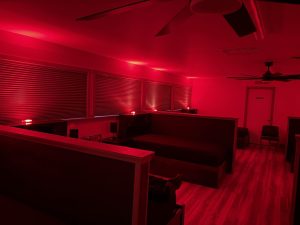
- VizAlert™ red lighting that ramps from dim to bright in bunk rooms, halls and common areas, with an LED strip along hallways and egress paths
- SafeTone™, the station tone, reshaped to ramp up instead of hitting at full volume
- EA Display Board, which puts the call nature, address and assigned crew on your station TVs
- Turnout Timer, counting up from dispatch where crews can see it
With EaseAlert®, you save, thanks to a proprietary wireless design.
How do you upgrade without hardwiring, step by step?
Six steps. Most of the real decisions happen in the first two.
1. Walk the station
Walk it yourself first. Count the bunks, trace the route from the bunk room to the apparatus bay, and note where the outlets are. Then book a free station assessment: an EaseAlert® solutions representative walks your stations and your dispatch setup and scopes what each station needs, and you come away with a budget estimate.
2. Confirm how the call gets to the station
This is where alerting projects get stuck, so settle it early. CAD data arrives immediately through a real-time application programming interface, with relay contact closures in place for redundant alerting pathways. Bring your dispatch center into the conversation and name your CAD platform. Then get the integration plan in writing before anyone orders hardware.
3. Plan the power
Devices run off the outlets already in the room, or hardwired power where you’d rather have it, decided device by device. Where an outlet is in the right place, that means plugging in, not pulling cable.
4. Place the devices
A BunkAlert™ at each bunk. VizAlert™ red lighting in the bunk rooms, halls and common areas, with the LED strip marking the path to the bay. SafeTone™ for the station tone, the EA Display Board on the station TVs, and the Turnout Timer where crews pass it on the way to the rig. Then issue a TacPod™ to each firefighter.
5. Roll out one station at a time
You don’t have to do the whole department at once. Start with one station, often the oldest one or the one where crews sleep, and add others as budget allows. Ask any vendor, in writing, whether stations you add later run on the same hardware.
6. Bring the crews in
Firefighters set their own unit assignment and BunkAlert™ vibration intensity at the bunk on the Peripheral Command Unit. Walk each shift through it. Crews are skeptical, and a system they don’t trust gets worked around, so the first week matters as much as the install.
We have tested EaseAlert for months and the feedback from the crews has provided us with great data-driven results that have opened our eyes to the impacts that our old station alerting system was having on our personnel. With safety and health being such a critical part of our jobs, we owe it to our firefighters to change how we approach station alerting.
Fire Chief Carlos Aviles
St. Augustine Fire Department
What about older and historic stations?
That’s where wireless pays off most. Masonry walls and plaster ceilings leave few places to hide a cable, so a hardwired retrofit can turn into a renovation. Take the home-run wiring off the job and the building’s age stops driving the price.
If your firehouse is a designated historic building, ask your city which alterations need approval before anyone quotes you conduit. A system that runs off existing outlets keeps most of that conversation short. And in a building with thick block walls, ask any vendor how wireless coverage gets checked before the install.
Read how St. Augustine brought healthier alerting to firefighters in the nation’s oldest city, and how Pflugerville Fire Department’s installation came together.
What does station alerting cost?
Start with the free station assessment, because that’s where a budget estimate for your own stations comes from.
For planning, most departments budget $30,000 to $80,000 per station across the category. Treat that as a planning number, not a quote. In older buildings, installation is the biggest swing, and that’s the line a wireless system goes after. EaseAlert® quotes each department on its own stations and needs. For everything else that moves the price, read our guide to fire station alerting system cost.
See EaseAlert in your station
Free station assessment · No obligation
- Wireless install retrofits easily into existing stations and fits cleanly into new builds
- Alert the whole station, a zone, or the one crew that's going
- Integrates with your existing CAD and dispatch processes, so you don't have to change workflows
- Trusted by fire departments nationwide
Prefer to spec it out first? Build your system online.
The bottom line
Walk your oldest station with a flashlight and trace where a new cable would have to run. Count the walls between the bunk room and the head end.
Then decide whether that’s a project you want to fund or one you can skip. With a wireless system, you can skip it.
Frequently asked questions
Can you upgrade fire station alerting without running new wires?
Yes. The EaseAlert® wireless system reaches its devices over an encrypted wireless link instead of home-run cabling. Its devices run off existing outlets or hardwired power, so there’s no conduit to run through the walls.
Does wireless station alerting work in older or historic stations?
Yes, and older buildings gain the most. With no conduit or cable runs to plan around masonry walls and closed ceilings, the building’s age stops driving the install cost. In a building with thick block walls, ask how wireless coverage is checked before the install, and if your station is a designated historic building, check with your city about which alterations need approval.
Is wireless station alerting secure?
EaseAlert’s Central Command Unit (CCU)™ reaches each device over a proprietary encrypted wireless mesh, and the system stays off the DoD network, which matters on military installations. Ask any vendor how their wireless link is encrypted, and get the answer in writing.
Is wireless station alerting reliable enough for every call?
Part of reliability is the path the call takes into the station. EaseAlert® takes CAD data through a real-time application programming interface, with relay contact closures in place for redundant alerting pathways. Ask every vendor what happens when the primary path goes down, and how the wireless link inside the station is monitored.
Can we upgrade one station at a time?
Yes. EaseAlert® is modular, so you can start with one station and add others as budget allows.
How much does station alerting cost?
Most departments budget $30,000 to $80,000 per station across the category, as a planning number rather than a quote, and installation is the biggest swing in older buildings. EaseAlert® quotes each department on its own stations, and a free station assessment gets you a budget estimate.
References
EaseAlert. (2026). Fire station alerting products. easealert.com
EaseAlert. (2026). Capabilities. easealert.com
EaseAlert. (2026). Client testimonials. easealert.com
More from the EaseAlert Blog